First public release
LiteGrid Turbo for VB6, Excel & Access
LiteGrid Turbo is one ActiveX/COM grid control with Embedded, Virtual and Turbo column-store engines. It supports editable cells, sorting, filtering, conditional formatting, x86/x64 hosts, and both registered and registration-free deployment.
An ActiveX/COM Grid Control (OCX) for VB6, Excel VBA, and Access developers
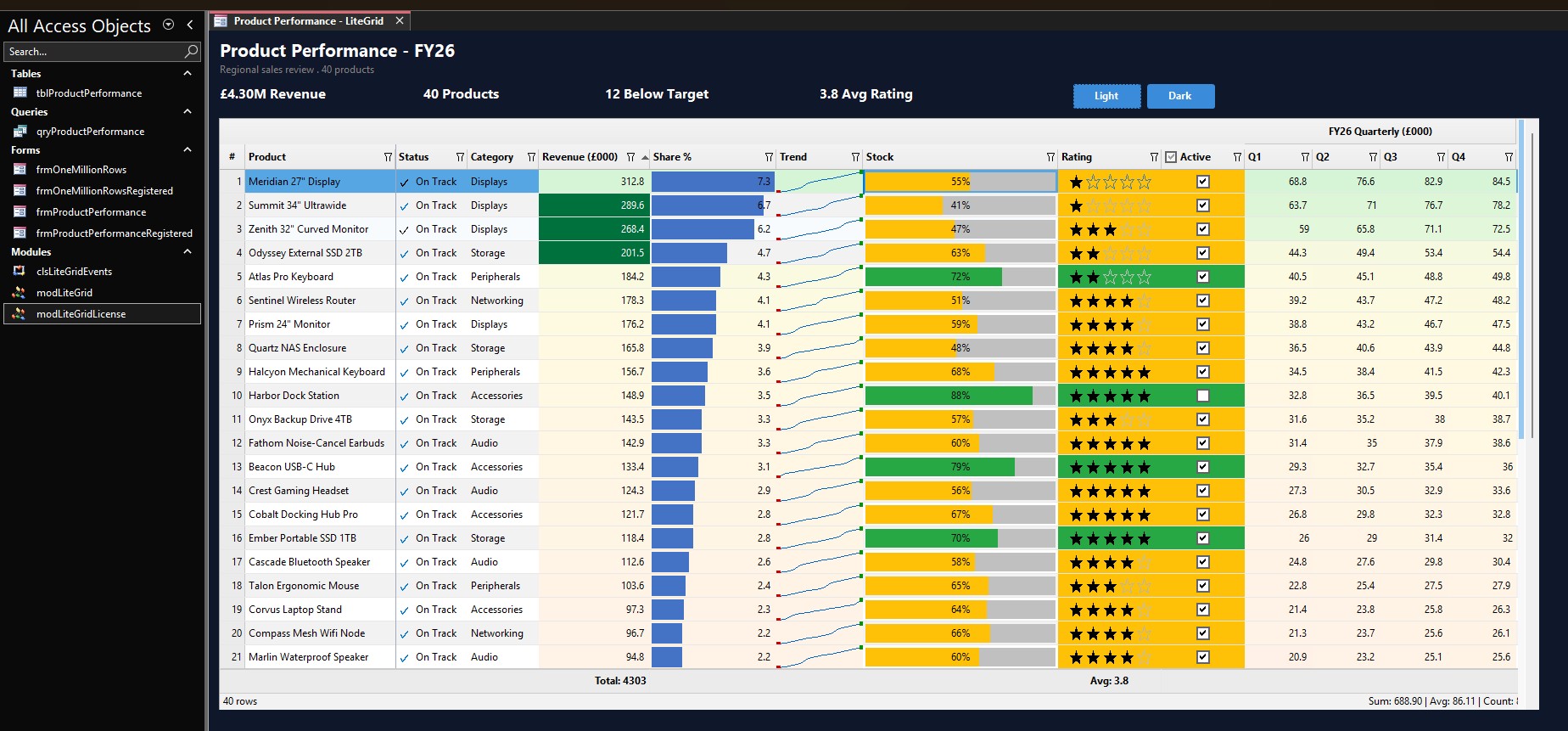
Watch LiteGrid Turbo in action
A short walkthrough of the control running inside Microsoft Access — loading data, switching themes, and the conditional formatting shown above.
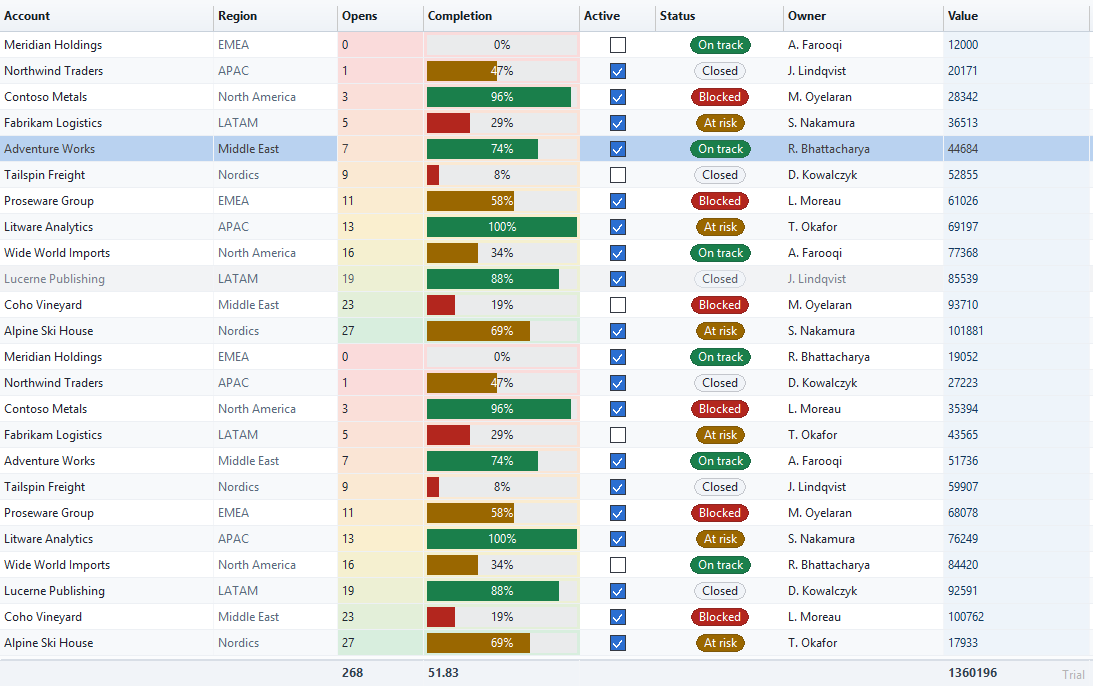
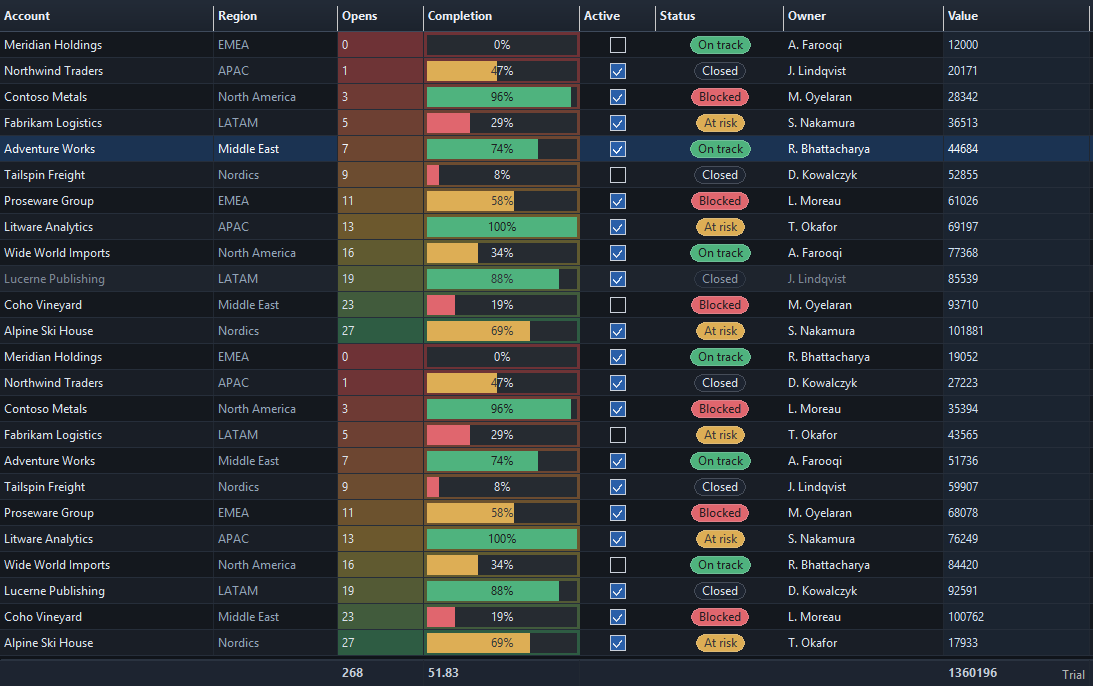
Light and dark themes, switched at run time
The same Microsoft Access form in the Porcelain and Slate themes. One ApplyThemeJson
call switches every color; per-column colors and status badges carry over unchanged.
One control, three data modes
Select the storage model explicitly while keeping one consistent COM surface.
Choose Embedded, Virtual or Turbo column-store mode
- Embedded mode is the default grid-owned row store
- Virtual mode keeps the dataset in your host application
- Turbo column-store mode materializes data in a grid-owned column store
- Exactly one mode is active at a time
A practical grid surface for VBA and VB6
Use the same control from VB6, Excel VBA and Microsoft Access, with architecture-matched x86/x64
binaries and the current LiteGridTurbo.LiteGridTurboCtrl ProgID.
- Modern rendering with 4 built-in themes
- 5 sort modes including multi-column and custom sorting
- 6 filter types: text, numeric, date, list, custom, and regex
- Conditional formatting, heatmaps, data bars, and icon sets
- Editable cells with checkbox and combo box column renderers, plus frozen rows and columns
- Virtual callbacks and a typed Turbo column-array loading API
- JSON import/export, sparklines, column groups, aggregations
Two Ways to Deploy. Zero Headaches.
Most ActiveX controls require admin rights and registry entries. LiteGrid Turbo works without either — but supports both deployment models, as a 32-bit or 64-bit ActiveX grid control (OCX), when you need them.
Registration-Free Mode
Drop the OCX file next to your application. No regsvr32, no admin rights, no COM
registration. Your app runs instantly on any machine.
How it works: Add a small bootstrap module (included below) that loads the OCX and activates the control. After that, create grids and use them from any form. Everything is handled internally — no manual configuration needed.
- No COM registration required
- No administrator permissions needed
- XCopy / USB / network share deployment
- Multiple versions can coexist on one machine
- Perfect for consultants distributing to clients
Ideal for: portable apps, client distributions, locked-down corporate machines, USB deployment
Registered (COM) Mode
Standard COM registration using regsvr32. Install once, use from any application on the
machine. Early binding and IntelliSense in the VB6 IDE and the VBA editor.
- System-wide registration for all applications
- Full IntelliSense and early binding in VB6 and VBA
- Centralized IT deployment via Group Policy
- Familiar workflow for Windows sysadmins
- Type library (.tlb) included for IDE support
Ideal for: enterprise IT rollouts, centrally managed environments, VB6 developers and anyone who prefers IntelliSense
Up and Running in Minutes
Whether you're adding an ActiveX grid control to a VB6 project, a VBA data grid to an
Excel UserForm, or an Access datasheet alternative, the setup below is the same two-step pattern.
Two ways in, both copy-paste. The registration-free route below needs
no admin rights — copy the kit's LiteGridTurbo folder next to your .accdb or
.xlsm, import one standard module, done.
Prefer the traditional registered route with IntelliSense and native event handlers in
VB6 or VBA? Use the registered-mode template
instead. Full bootstrap reference: Registration-Free Deployment.
' 1. Copy the kit's LiteGridTurbo folder (it holds x86\ and x64\) next to
'    your workbook or database.
' 2. Import vba\modLGTRegFree.bas from the kit once per project
'    (VBA editor: File > Import File).
' 3. Edit only these two constants at the top of that module:
Private Const LGT_COMPANY As String = "Your Company"
Private Const LGT_KEY     As String = ""    ' empty = evaluation

' The module gives you:
'   CreateGridIn(hostContainer, baseFolder)  a visible grid over a Frame
'                                            (Excel) or an Option Group (Access)
'   CreateDataGrid(baseFolder)               the full API with no window
'   DestroyGrid(grid)                        optional, deterministic cleanup
' No regsvr32, no COM registration, no administrator rights.' UserForm code. The form has a Frame named fraGrid.
Private m_grid As Object
Private Sub UserForm_Initialize()
' baseFolder = the kit folder you copied next to the workbook
Set m_grid = CreateGridIn(Me.fraGrid, ThisWorkbook.Path & "\LiteGridTurbo")
' Add columns: header text, width in pixels
m_grid.AddColumn "Employee Name", 200
m_grid.AddColumn "Department", 150
m_grid.AddColumn "Annual Salary", 120
' Add rows: one array per row, in column order
m_grid.AddRow Array("John Smith", "Engineering", 95000)
m_grid.AddRow Array("Jane Doe", "Marketing", 87000)
m_grid.AddRow Array("Bob Wilson", "Finance", 102000)
' Sort by clicking a header; filter from the header buttons
m_grid.AutoSortOnHeaderClick = True
m_grid.ShowFilterButtons = True
End Sub
Private Sub UserForm_Terminate()
DestroyGrid m_grid
Set m_grid = Nothing
End Sub' UserForm code, same Frame fraGrid. Sheet1 holds a table in A1:F500
' with the column names in row 1.
Private m_grid As Object
Private Sub UserForm_Initialize()
Set m_grid = CreateGridIn(Me.fraGrid, ThisWorkbook.Path & "\LiteGridTurbo")
' One call loads the range; AutoDetectColumns turns row 1 into the
' column headers and types each column from its values
m_grid.LoadFromRange Sheet1.Range("A1:F500")
m_grid.AutoDetectColumns True
' Colour the Revenue column (column D, index 3) as a heatmap
m_grid.SetColumnHeatmap 3, True
' Draw value bars in the Units column (column E, index 4)
m_grid.SetColumnDataBar 4, True
End Sub
' UserForm_Terminate: the same as in the previous exampleWhat Developers Build With LiteGrid Turbo
Typical screens VBA and VB6 developers build with LiteGrid Turbo.
Data Dashboards in Excel
Display large datasets with sorting, filtering, heatmaps, and conditional formatting — all inside Excel UserForms, fed directly from worksheet ranges.
Database Browsers in Access
Browse DAO and ADO recordsets with instant sorting, column filtering, and virtual mode. Handle millions of records without loading them all into memory.
Report Previews in VB6 Applications
Build formatted report previews with conditional colors, data bars, icon sets, and aggregation rows — right inside your VB6 or VBA application.
Data Explorers
Load JSON text, arrays, Excel ranges or Recordsets with one call. Let users sort, filter, search, and export to CSV, JSON or Excel — without leaving your VB6, Excel, or Access application.
Everything You Need. Nothing You Don't.
A complete data grid control — not a wrapper, not a shim. Real APIs that do real work.
Data & Loading
Data Loading
Load from VBA arrays, Excel ranges, DAO/ADO recordsets, or JSON strings. One API call to populate the entire grid.
33 Native ActiveX Grid Events
CellClick, CellDoubleClick, SelectionChanged, BeforeSort, AfterFilter, ColumnResize, RowExpand, ScrollEnd, and more — delivered as native COM events in VB6 and VBA.
Virtual Mode
The host owns the dataset while the grid caches a viewport window. Rows are requested on demand through the virtual callback/event surface; sorting and filtering requests are handled by the host.
JSON Import / Export
Import JSON arrays or objects directly into the grid. Export grid data back to JSON for API calls, file saving, or clipboard operations.
Sorting, Filtering & Formatting
Sorting & Filtering
5 sort modes (ascending, descending, multi-column, custom, natural) and 6 filter types (text, numeric, date, list, custom, regex).
Conditional Formatting & Heatmaps
Apply rules-based formatting, gradient heatmaps, data bars, and icon sets to any column. Highlight outliers, trends, and thresholds automatically.
Sparklines & Icons
Embed line, bar, and win/loss sparklines in any cell. Add icon sets (arrows, flags, stars) based on cell values or custom rules.
Column Groups & Aggregations
Group columns under shared headers. Add aggregation rows with sum, average, count, min, max, or custom formulas per column.
Documentation
LiteGrid Turbo provides two ActiveX/COM interfaces: ILiteGridTurboCtrl (the grid control) and ILiteGridTurboHelper (a standalone JSON helper with 18 methods, usable without the grid).
Architecture
LiteGridTurboLib
  |
  +-- ILiteGridTurboCtrl          (Data grid OCX)
  |     coclass: LiteGridTurboCtrl
  |     33 events via _DLiteGridTurboCtrlEvents
  |
  +-- ILiteGridTurboHelper        (Standalone JSON helper)
        coclass: LiteGridTurboHelper
        18 JSON methods, no grid required
Documentation Pages
Explore ILiteGridTurboCtrl for the full grid API, or ILiteGridTurboHelper if you only need JSON parsing. Deploying without admin rights? See Registration-Free.
Technical identity: LiteGridTurboLib
Early-launch pricing
LiteGrid Turbo is one product. Embedded, Virtual and Turbo column-store modes are included in the same architecture-matched OCX. Developer, Site and Enterprise early-launch prices are available for a limited buyer allocation and return to their regular prices when Imranosoft closes the launch offer.
| License | Regular price | Early-launch offer | Renewal |
|---|---|---|---|
| Developer | USD 199Limited early-launch price | USD 99per year, optional | |
| Site | USD 1,299Limited early-launch price | USD 599per year, optional | |
| Enterprise | USD 2,999Priority onboarding plus two years of updates and priority support | USD 999per year, optional |
- Developer: one named developer, up to five development machines, and royalty-free distribution in unlimited applications to unlimited end users.
- Site: unlimited developers based at one licensed business location, with royalty-free distribution in unlimited applications to unlimited end users.
- Enterprise: unlimited developers across every location of one legal entity, unlimited development and CI/build machines, royalty-free commercial distribution, priority onboarding, and priority support.
Licenses are perpetual. Developer and Site include one year of updates and support; the Enterprise early-launch package includes two years. After that term, renewal is optional and covers updates and support only — the license itself never expires. If you do not renew, your license and the last eligible version continue working.
LiteGrid Turbo includes 32-bit and 64-bit ActiveX/COM builds.
Use LiteGridTurbo.LiteGridTurboCtrl from a registered host or the matching
LiteGridTurbo_* exports for registration-free creation.
Questions about LiteGrid Turbo or licensing? See how evaluation works, or email imran@imranosoft.com.
System Requirements
- Windows 10 or Windows 11
- VB6 (32-bit), Excel VBA or Microsoft Access VBA
- An x86 or x64 OCX matching the host process
Frequently Asked Questions
What is LiteGridTurboCtrl?
_DLiteGridTurboCtrlEvents dispinterface.Is LiteGrid Turbo a VB6 grid control?
regsvr32 for
full IntelliSense and early binding in the VB6 IDE, or use
registration-free mode to deploy without
regsvr32 or admin rights.How do I evaluate LiteGrid Turbo?
What happens when my evaluation ends?
ActivateLicense call that runs each time your application starts,
and the same OCX works again immediately.What is ILiteGridTurboHelper?
CreateObject without
requiring the grid control, making it useful for parsing and building JSON in any VBA or COM
project.